Office Ergonomics
Ergonomics is about ensuring a good fit between people and their workplace.
Due to the use of computers in both the workplace and in the home, tens of millions of users are suffering from work based injuries aka RSI or Repetitive Strain Injuries. As a result, many devices have been produced in order to make the workstation a more comfortable place i.e. chairs, foot stools, wrist rests, supports etc. The majority of computer users do find these a help.
Due to the prolonged periods of time sitting in one position the following occurs: the muscles and tendons of the hands, arms, and neck and back weaken as a result of the repeated stress throughout the day. These stresses then produce swelling of the involved joint which in turn produces pain (see also Mechanical Joint Dysfunction).
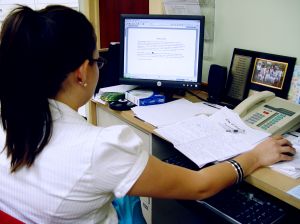 Computer users should not ignore hand pain, wrist or forearm pain, numbness (day or more commonly when sleeping) and burning or tingling sensations which can start in the hands and work its way to the neck and shoulders. The above symptoms can be a start to RSI and it is advisable that the sufferer seeks attention- prevention is the key.
Helpful hints to improve your work environment and to reduce the prevalence of RSI injuries:
Please note: The following instructions apply ONLY to those patients who have consulted the clinic.
- Correct adjustable high back chair.
- Proper posture.
- Adequate physical exercise.
- Warm up and stretch before, during and after computer use.
- Frequent rest breaks.
- Careful alignment of the workstation.
- Correct desk height for the worker.
- **Computer terminal should be at eye level immediately in front of you**
- Feet should be flat on the floor, not dangling from your chair.
- Your back should be firmly placed in the back of your chair.
- Your spine should be relatively upright.
- Your elbows should be at 90 degrees.
- Wrists should not be extended.
- Foam wrist rest.
- Avoid wrist splints or braces .
Advantages of a correct workstation:
- Increase worker comfort.
- Increase worker productivity.
- Increase worker job satisfaction.
- Reduce operator error.
- Reduce accidents.
- Reduce sickness at work.
Is your workstation ergonomically suitable?
- Does it suit your body size?
- Does it also suit other users?
- Can you see and hear all you need readily?
- Do errors occur frequently, and is it easy to recover from them?
- Does the system you are using cause any discomfort if used for any length of time?
- Could any aspects be improved?
- Do other workers have similar complaints?
- Is the lighting correct, are their shadows?
Suggested Stretches:
- Neck bends (ear to shoulder).
- Neck towel exercise.
- Shoulder stretch along a wall.
- Wrist stretch.
- Finger stretch.
- Back extension.